Web Dashboard and API
edaf-web is a lightweight monitoring and analysis UI built with Spring Boot + Thymeleaf + vanilla JavaScript.
1) Startup
From <repo-root> run:
mvn -q -pl edaf-web -am package -DskipTests
EDAF_DB_URL="jdbc:sqlite:$(pwd)/edaf-v3.db" java -jar edaf-web/target/edaf-web-*.jar
Use -pl edaf-web -am from repo root to ensure sibling modules are on classpath.
Stop the server with Ctrl+C.
Open:
Configuration source:
<repo-root>/edaf-web/src/main/resources/application.yml
1.1) Visual Preview
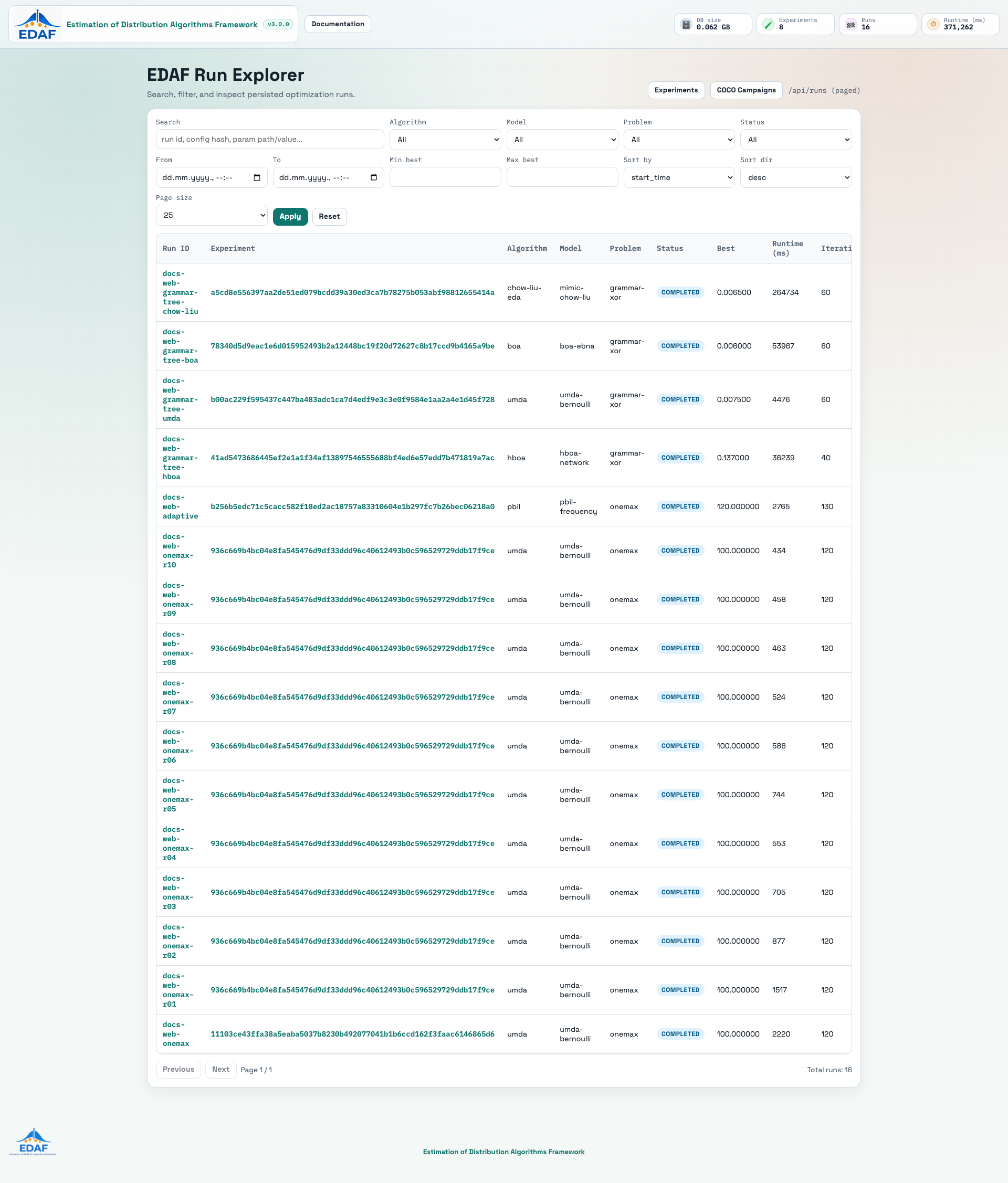
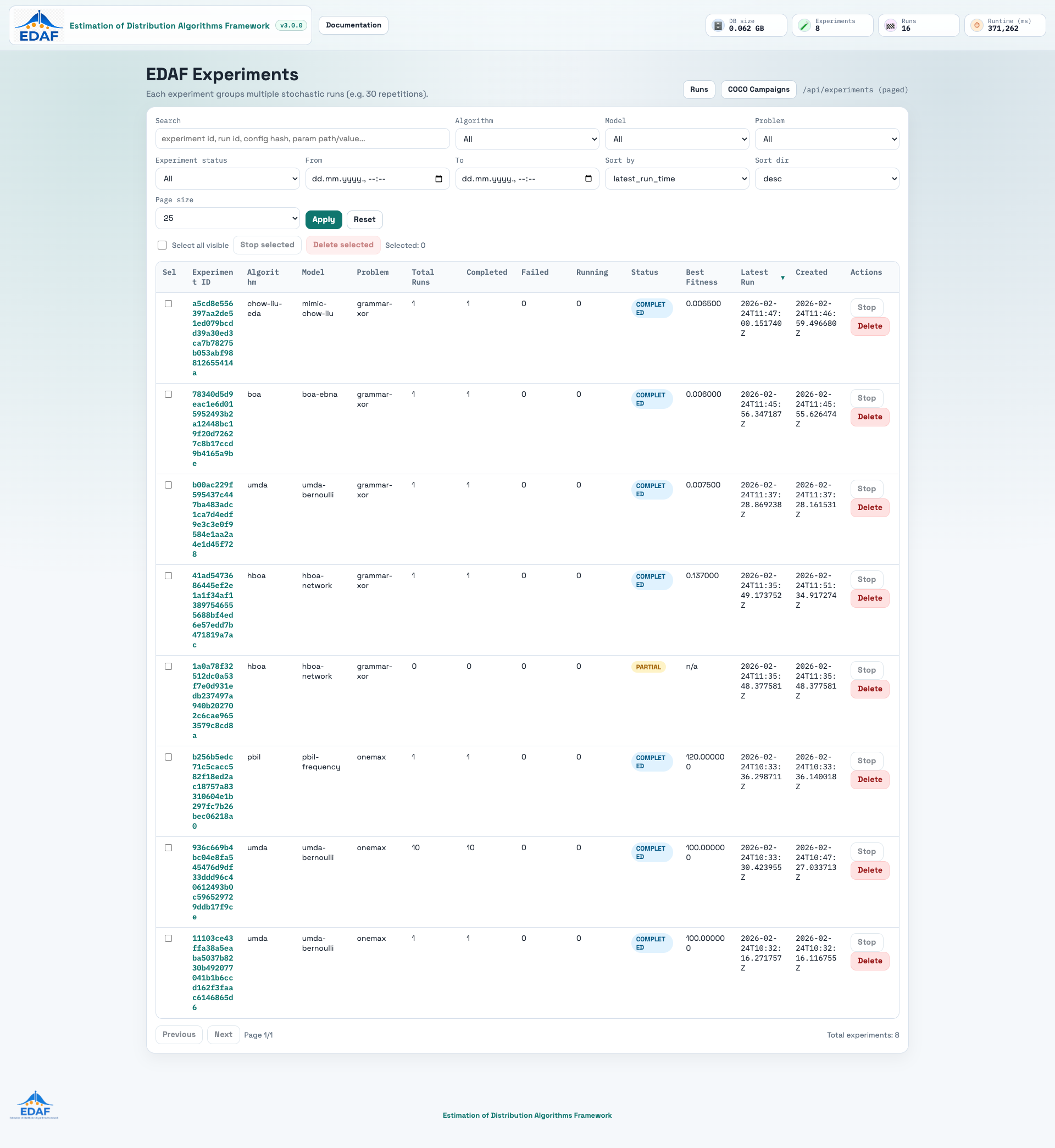
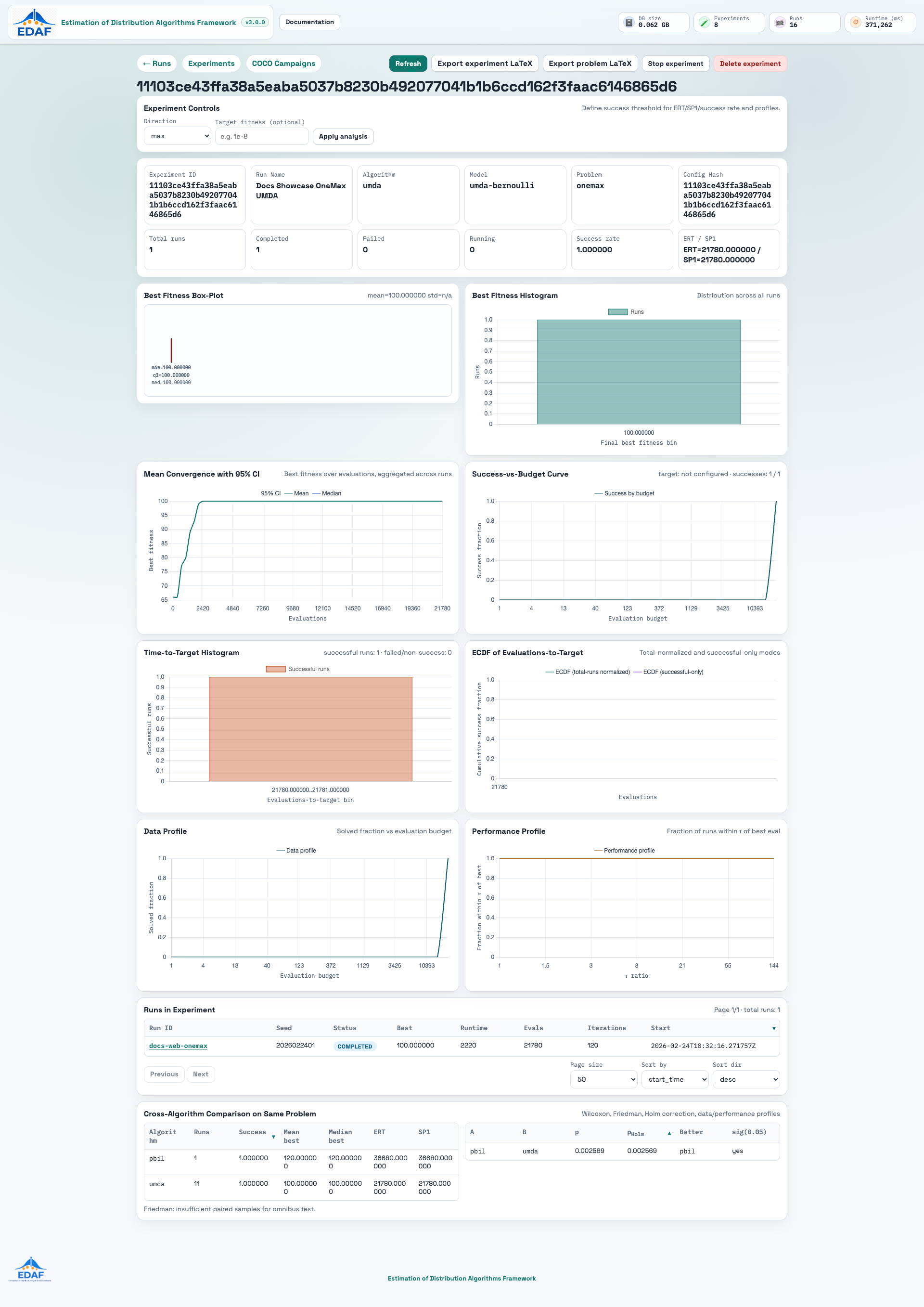
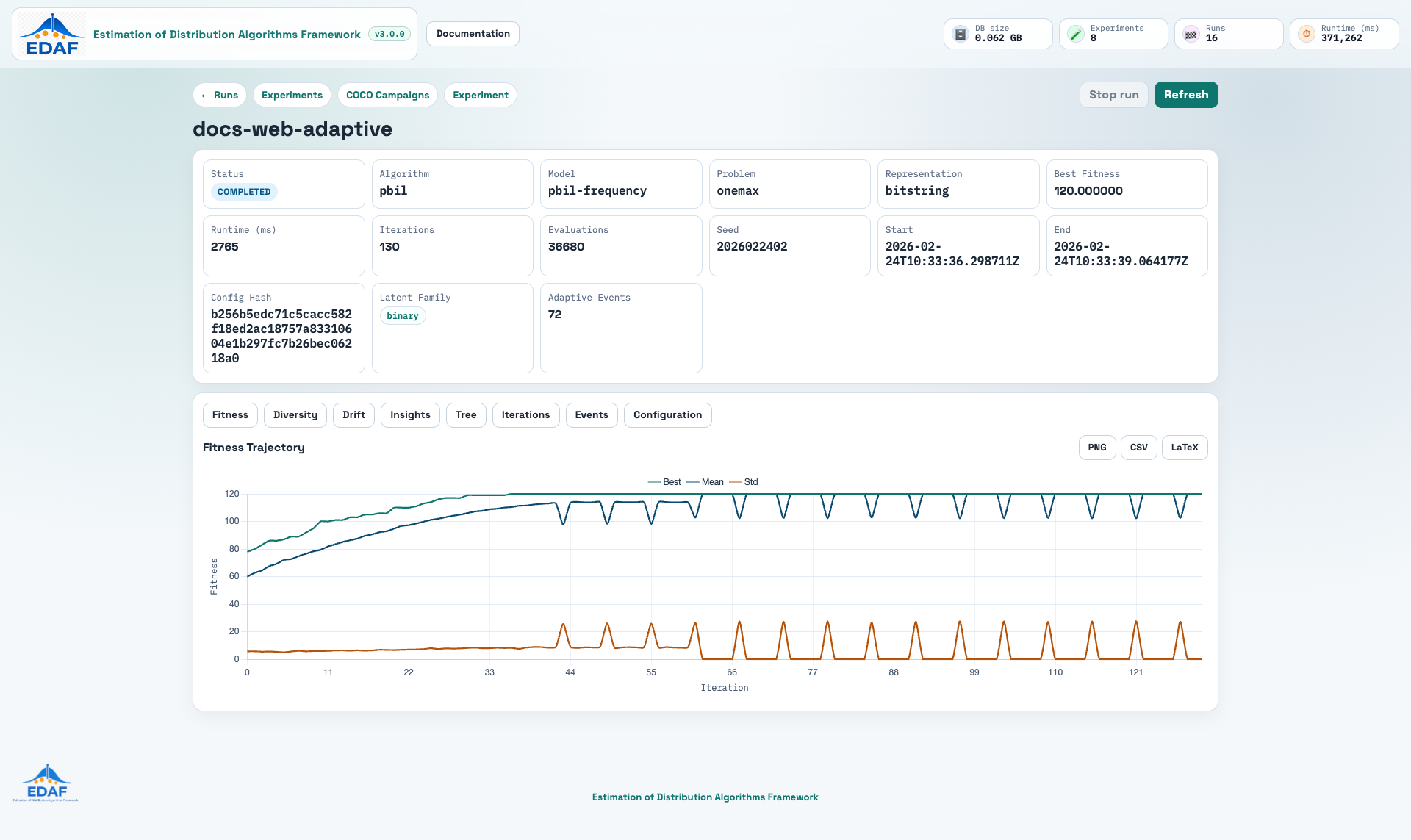
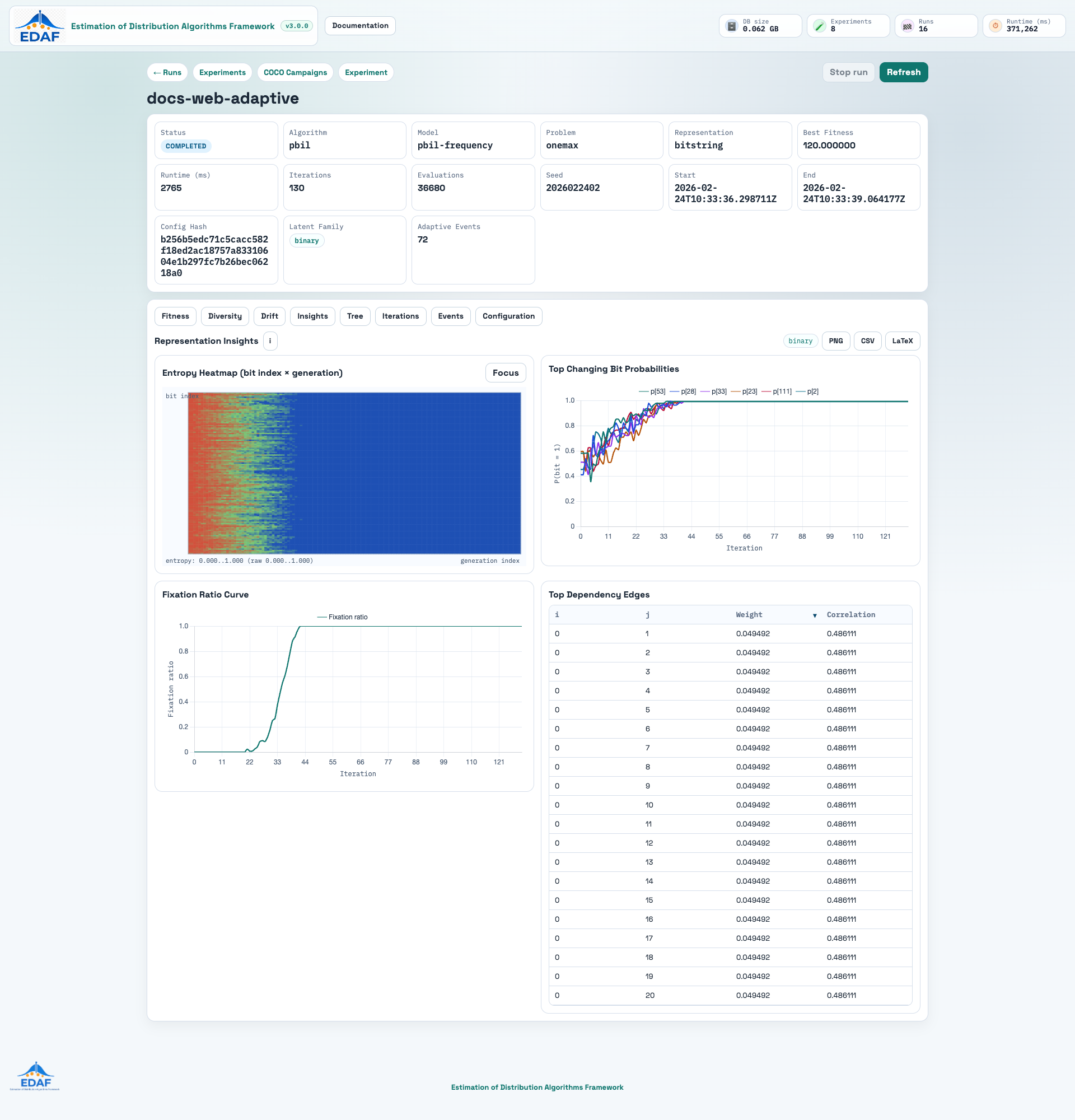
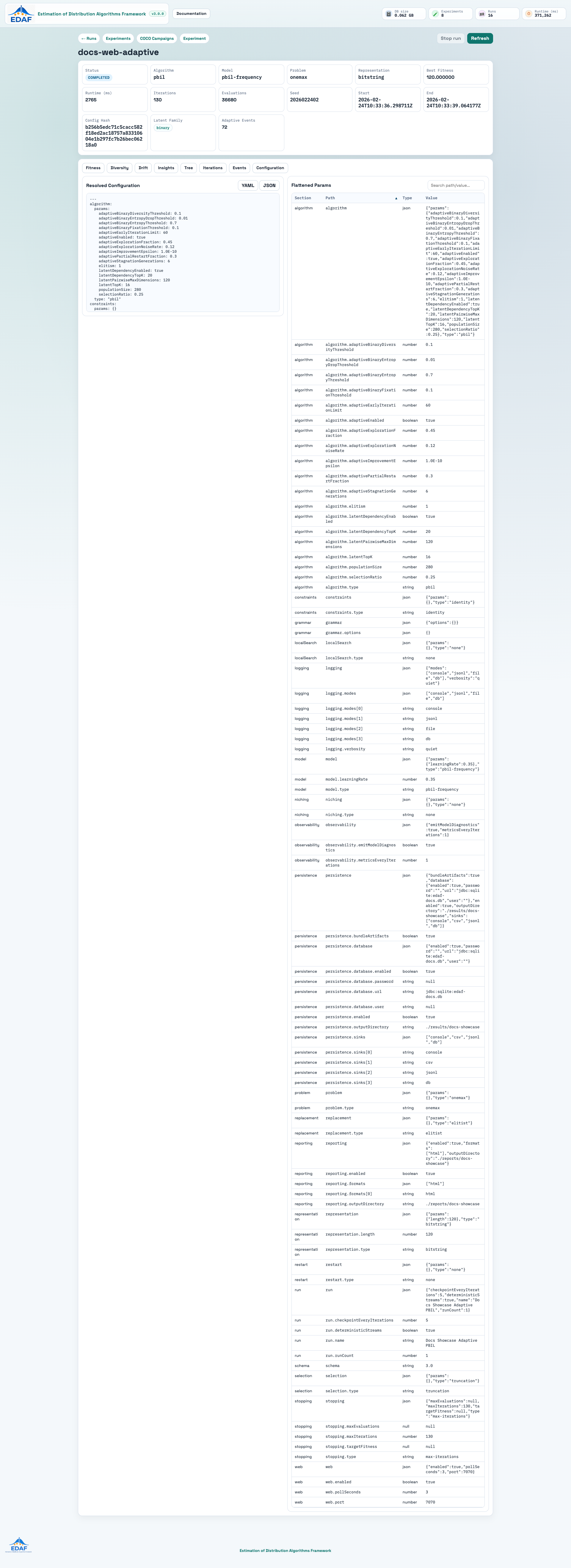
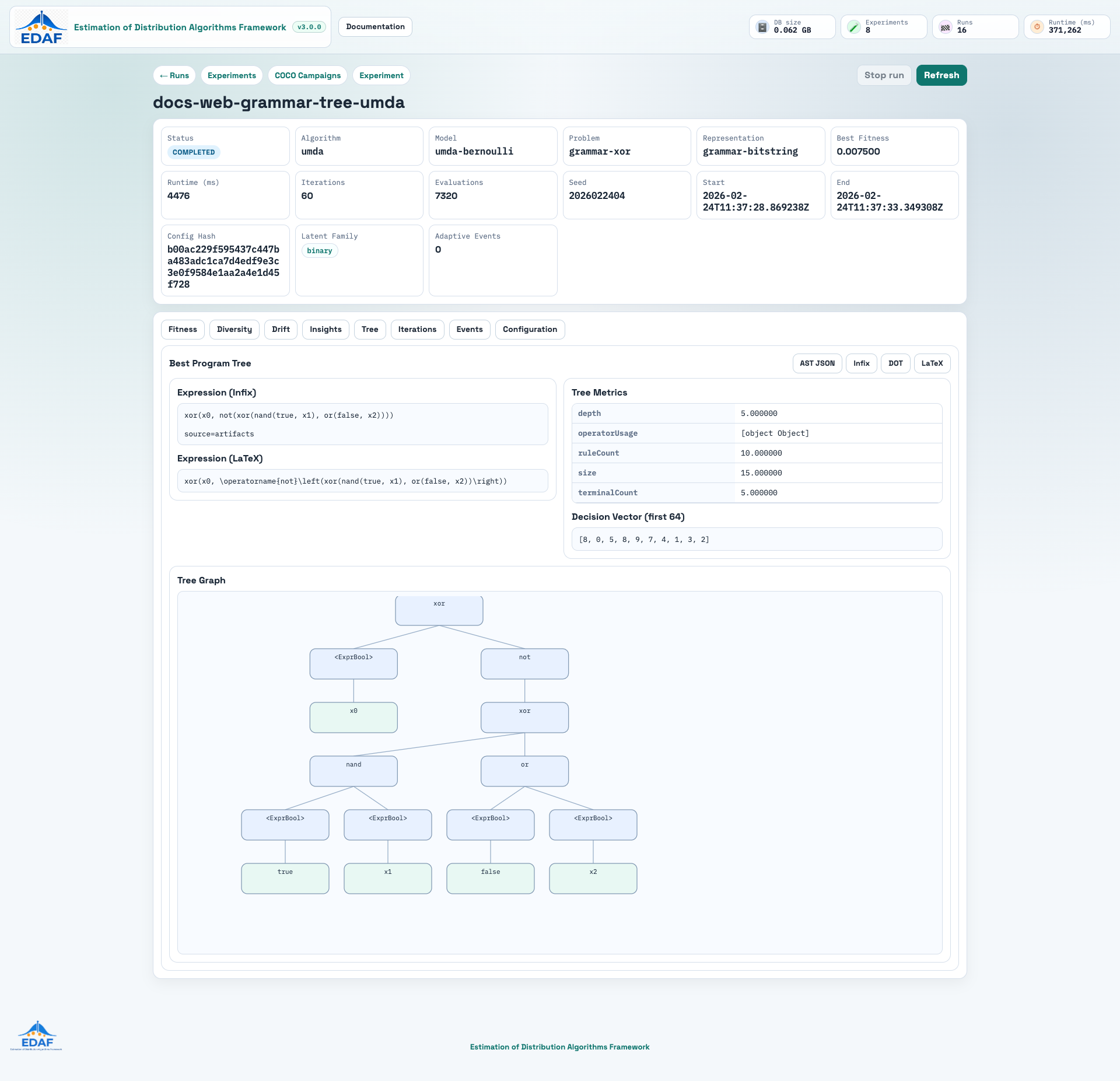
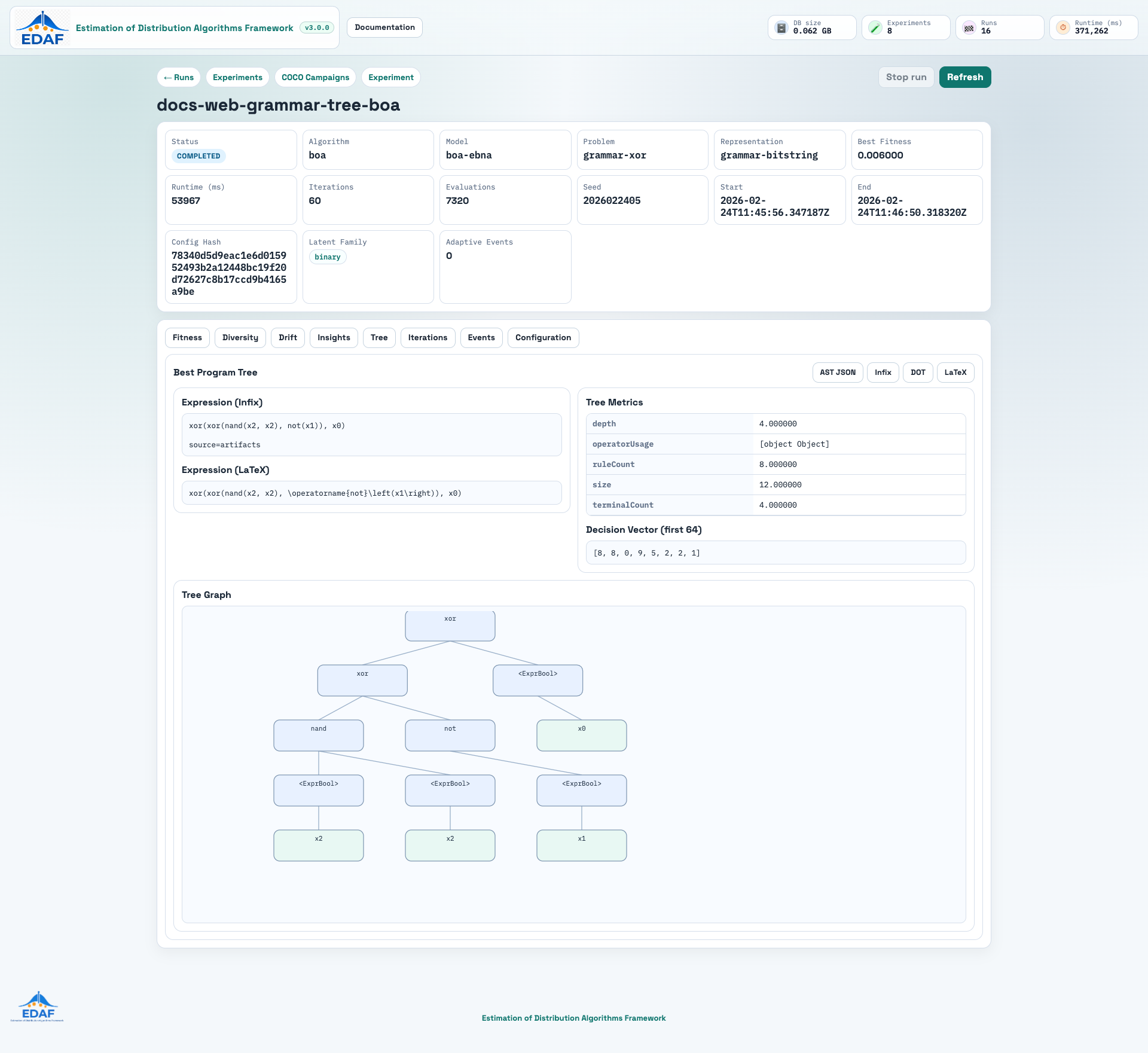
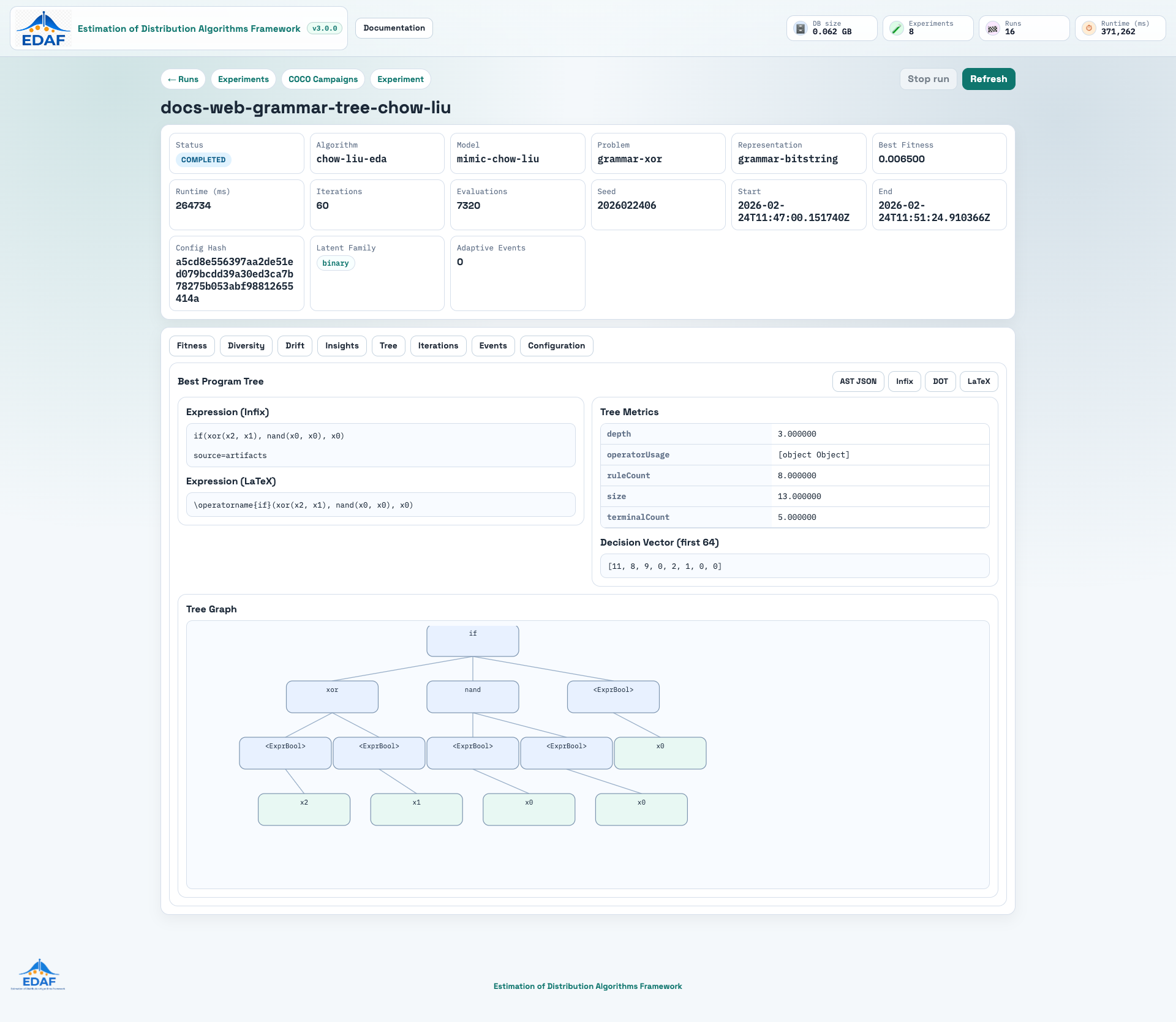
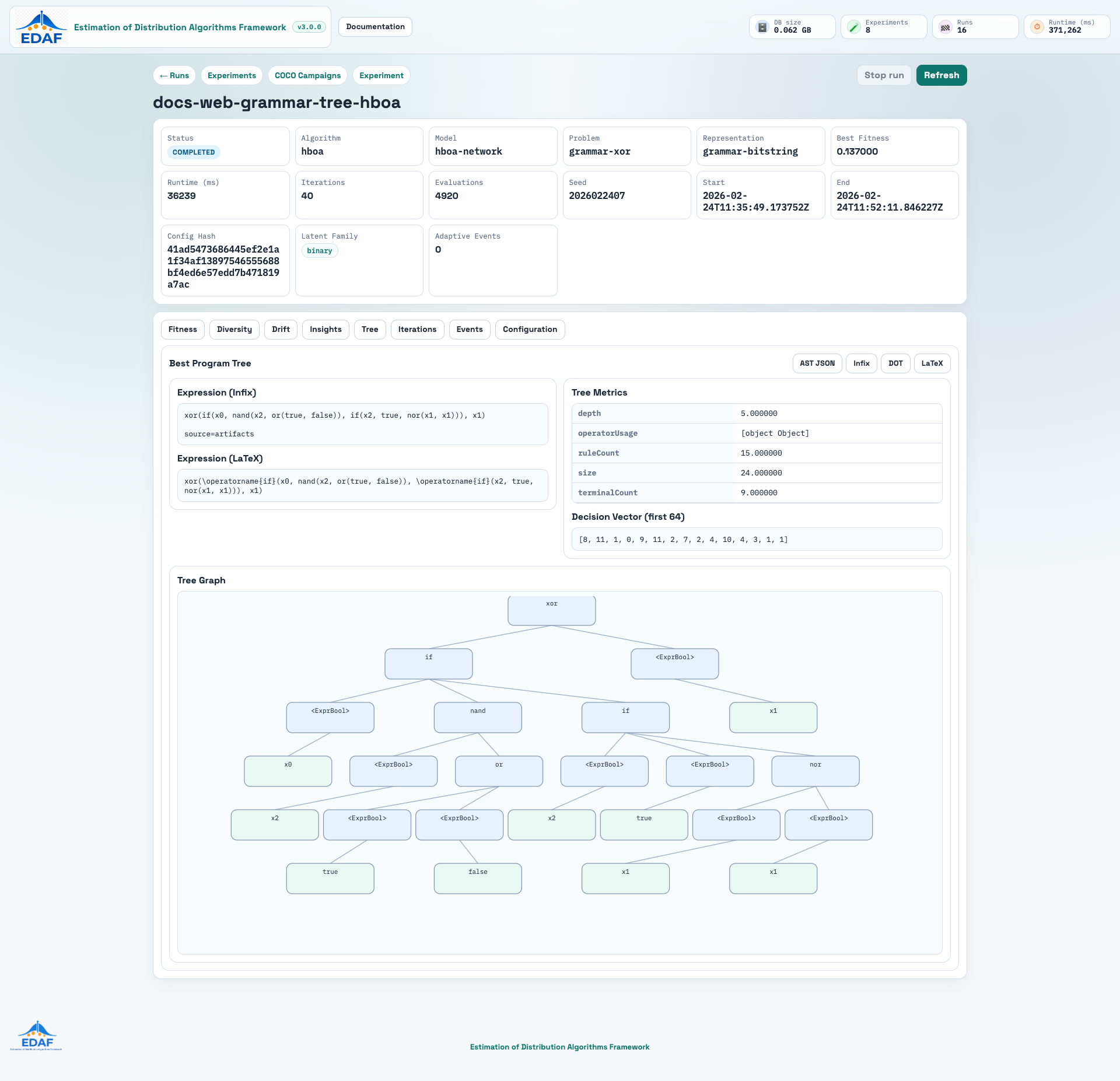
The following screenshots are captured from real persisted runs in edaf-docs.db:

1.2) Reproduce the Screenshot Dataset
The screenshots above were generated from these showcase configs:
<repo-root>/configs/docs/web-screenshot-onemax.yml<repo-root>/configs/docs/web-screenshot-adaptive.yml<repo-root>/configs/docs/web-screenshot-grammar-tree-umda.yml<repo-root>/configs/docs/web-screenshot-grammar-tree-boa.yml<repo-root>/configs/docs/web-screenshot-grammar-tree-chow-liu.yml<repo-root>/configs/docs/web-screenshot-grammar-tree-hboa.yml
Run commands:
cd <repo-root>

# 10 repeated runs for experiment-level analytics.
# SQLite is single-writer, so force sequential batch execution:
EDAF_BATCH_PARALLELISM=1 ./edaf batch -c configs/docs/web-screenshot-batch.yml --verbosity quiet

# one adaptive run for events/insights panels
./edaf run -c configs/docs/web-screenshot-adaptive.yml --verbosity quiet

# one grammar/tree run for Tree tab visualization
./edaf run -c configs/docs/web-screenshot-grammar-tree-umda.yml --verbosity quiet
./edaf run -c configs/docs/web-screenshot-grammar-tree-boa.yml --verbosity quiet
./edaf run -c configs/docs/web-screenshot-grammar-tree-chow-liu.yml --verbosity quiet
./edaf run -c configs/docs/web-screenshot-grammar-tree-hboa.yml --verbosity quiet

# launch web on dedicated docs database
mvn -q -pl edaf-web -am package -DskipTests
EDAF_DB_URL="jdbc:sqlite:$(pwd)/edaf-docs.db" java -jar edaf-web/target/edaf-web-*.jar
Optional screenshot recapture (Playwright CLI):
npx -y playwright@1.51.1 install chromium
npx -y playwright@1.51.1 screenshot --browser=chromium --viewport-size='1920,1080' --full-page \
  --wait-for-timeout=3500 http://localhost:7070 docs/assets/screenshots/web-dashboard-runs.png
npx -y playwright@1.51.1 screenshot --browser=chromium --viewport-size='1920,1080' --full-page \
  --wait-for-timeout=3500 http://localhost:7070/experiments docs/assets/screenshots/web-dashboard-experiments.png
npx -y playwright@1.51.1 screenshot --browser=chromium --viewport-size='1920,1080' --full-page \
  --wait-for-timeout=5000 "http://localhost:7070/experiments/11103ce43ffa38a5eaba5037b8230b492077041b1b6ccd162f3faac6146865d6" docs/assets/screenshots/web-dashboard-experiment-detail.png
npx -y playwright@1.51.1 screenshot --browser=chromium --viewport-size='1920,1080' --full-page \
  --wait-for-timeout=5000 "http://localhost:7070/runs/docs-web-adaptive" docs/assets/screenshots/web-dashboard-run-fitness.png
npx -y playwright@1.51.1 screenshot --browser=chromium --viewport-size='1920,1080' --full-page \
  --wait-for-timeout=5000 "http://localhost:7070/runs/docs-web-adaptive?tab=insights" docs/assets/screenshots/web-dashboard-run-insights.png
npx -y playwright@1.51.1 screenshot --browser=chromium --viewport-size='1920,1080' \
  --wait-for-timeout=5000 "http://localhost:7070/runs/docs-web-adaptive?tab=events" docs/assets/screenshots/web-dashboard-run-events.png
npx -y playwright@1.51.1 screenshot --browser=chromium --viewport-size='1920,1080' \
  --wait-for-timeout=5000 "http://localhost:7070/runs/docs-web-adaptive?tab=config" docs/assets/screenshots/web-dashboard-run-configuration.png
npx -y playwright@1.51.1 screenshot --browser=chromium --viewport-size='1920,1080' \
  --wait-for-timeout=5000 "http://localhost:7070/runs/docs-web-grammar-tree-umda?tab=tree" docs/assets/screenshots/web-dashboard-run-grammar-tree.png
npx -y playwright@1.51.1 screenshot --browser=chromium --viewport-size='1920,1080' \
  --wait-for-timeout=5000 "http://localhost:7070/runs/docs-web-grammar-tree-umda?tab=tree" docs/assets/screenshots/web-dashboard-run-grammar-tree-umda.png
npx -y playwright@1.51.1 screenshot --browser=chromium --viewport-size='1920,1080' \
  --wait-for-timeout=5000 "http://localhost:7070/runs/docs-web-grammar-tree-boa?tab=tree" docs/assets/screenshots/web-dashboard-run-grammar-tree-boa.png
npx -y playwright@1.51.1 screenshot --browser=chromium --viewport-size='1920,1080' \
  --wait-for-timeout=5000 "http://localhost:7070/runs/docs-web-grammar-tree-chow-liu?tab=tree" docs/assets/screenshots/web-dashboard-run-grammar-tree-chow-liu.png
npx -y playwright@1.51.1 screenshot --browser=chromium --viewport-size='1920,1080' \
  --wait-for-timeout=5000 "http://localhost:7070/runs/docs-web-grammar-tree-hboa?tab=tree" docs/assets/screenshots/web-dashboard-run-grammar-tree-hboa.png
2) UI Pages
/ Run Explorer
Features:
- full-text search (
q) - filters: algorithm, model, problem, status
- ranges:
from,to,minBest,maxBest - sorting:
start_time,best_fitness,runtime_millis,status - pagination and page size control
- URL query-state persistence
- per-row safe stop action for
RUNNINGruns - link to COCO campaign explorer
/runs/{runId} Run Detail
Features:
- run summary cards
- tabs for:
- fitness (
best,mean,std) - diversity
- drift
- representation insights
- iterations/checkpoints
- events
- configuration
- representation-specific insights:
- binary: entropy heatmap, probability trajectories, fixation curve, dependency edges
- permutation: item-position heatmap, consensus drift, adjacency trends
- real: sigma heatmap, mean trajectories, eigen summary
- heatmap focus mode (zoom, color range, pinned tooltip, Esc-to-close)
- sortable iteration/checkpoint/event/config tables
- large payload-safe event preview with expandable details
- YAML/JSON config toggle + flattened params search
- responsive layout with overflow-safe containers
- adaptive timeline table from
adaptive_actionevents - consistent status colors (
RUNNINGgreen,COMPLETEDblue,FAILEDred,STOPPEDamber) - deep-link support for active tab via query parameter:
/runs/{runId}?tab=fitness/runs/{runId}?tab=insights/runs/{runId}?tab=events/runs/{runId}?tab=config
/experiments Experiment Explorer
Features:
- one row per experiment (
experiment_id) with grouped run counters - search over experiment ids, run ids, config hash, and flattened params
- filters: algorithm/model/problem/date range
- sorting + pagination for large benchmark campaigns
- per-row safe stop action
- per-row hard-delete action (with confirmation; blocked while run status is
RUNNING) - bulk selection with:
Stop selectedDelete selected
/experiments/{experimentId} Experiment Detail
Features:
- experiment metadata and run counters
- run table for all repetitions in one experiment
- mean convergence with 95% CI over evaluation budgets
- success-vs-budget curve (target-aware)
- time-to-target histogram (successful runs)
- ECDF of evaluations-to-target:
- total-runs normalized mode
- successful-only mode
- run-level box-plot and histogram (best fitness distribution)
- data profile and performance profile charts
- success rate, ERT, SP1 summary
- cross-algorithm same-problem section:
- Wilcoxon pairwise tests
- Holm correction
- Friedman omnibus ranking
- one-click LaTeX export buttons
- flattened params table with client-side filtering
Stop experimenttoolbar action (cooperative stop request)- toolbar hard-delete action for full experiment cleanup (blocked while run status is
RUNNING)
/coco COCO Campaign Explorer
Features:
- campaign search (
campaign id,name,notes) - filters: status, suite
- sorting and pagination
/coco/{campaignId} COCO Campaign Detail
Features:
- campaign summary cards
- ERT-ratio-by-dimension chart
- optimizer configuration table
- aggregate metrics table
- trial table with filters (
optimizer,functionId,dimension,reachedTarget)
3) REST API Endpoints
Run endpoints
GET /api/experimentsGET /api/runsGET /api/runs/{runId}GET /api/runs/{runId}/iterationsGET /api/runs/{runId}/eventsGET /api/runs/{runId}/checkpointsGET /api/runs/{runId}/paramsGET /api/facetsGET /api/experiments/{experimentId}DELETE /api/experiments/{experimentId}POST /api/experiments/{experimentId}/stopPOST /api/experiments/delete-bulkGET /api/experiments/{experimentId}/runsGET /api/experiments/{experimentId}/analysisGET /api/experiments/{experimentId}/latexPOST /api/runs/{runId}/stopGET /api/analysis/problem/{problemType}GET /api/analysis/problem/{problemType}/latex
DELETE /api/experiments/{experimentId} returns:
200with deleted row counters404when experiment does not exist409when at least one run in the experiment is stillRUNNING
POST /api/runs/{runId}/stop and POST /api/experiments/{experimentId}/stop return:
200when stop request is accepted404when run/experiment does not exist409when target exists but is not in a stoppable state
Analysis query params:
directionin{min,max}target(optional success threshold)algorithm(repeatable; optional subset for problem comparison)
Experiment analysis payload additionally includes:
targetFitness,targetSourceconvergence95Ci[](x,mean,ciLower,ciUpper,median,samples)successVsBudget[]timeToTargetHistogram[]ecdfTotalRuns[]ecdfSuccessfulRuns[]
GET /api/runs query params:
qalgorithmmodelproblemstatusfromtominBestmaxBestpagesizesortByin{start_time,best_fitness,runtime_millis,status}sortDirin{asc,desc}
GET /api/runs/{runId}/events query params:
eventType(for exampleadaptive_action)q(payload text search)pagesize
GET /api/experiments query params:
qalgorithmmodelproblemstatus(RUNNING|COMPLETED|FAILED|PARTIAL)fromtopagesizesortByin{created_at,total_runs,best_fitness,algorithm_type,model_type,problem_type}sortDirin{asc,desc}
COCO endpoints
GET /api/coco/campaignsGET /api/coco/campaigns/{campaignId}GET /api/coco/campaigns/{campaignId}/optimizersGET /api/coco/campaigns/{campaignId}/aggregatesGET /api/coco/campaigns/{campaignId}/trials
GET /api/coco/campaigns query params:
qstatussuitepagesizesortByin{created_at,started_at,finished_at,status,name}sortDirin{asc,desc}
GET /api/coco/campaigns/{campaignId}/trials query params:
optimizerfunctionIddimensionreachedTargetpagesize
4) API Examples
curl "http://localhost:7070/api/runs?page=0&size=25&sortBy=start_time&sortDir=desc"
curl "http://localhost:7070/api/runs?algorithm=umda&problem=onemax&status=COMPLETED"
curl "http://localhost:7070/api/runs?q=problem.genotype.maxDepth"
curl "http://localhost:7070/api/runs/umda-onemax-v3/events?eventType=iteration_completed&q=entropy&page=0&size=20"
curl "http://localhost:7070/api/runs/latent-adaptive-showcase-onemax/events?eventType=adaptive_action&page=0&size=20"
curl "http://localhost:7070/api/facets"
curl -X DELETE "http://localhost:7070/api/experiments/<experimentId>"
curl -X POST "http://localhost:7070/api/runs/<runId>/stop" -H "Content-Type: application/json" -d '{"reason":"manual stop"}'
curl -X POST "http://localhost:7070/api/experiments/<experimentId>/stop" -H "Content-Type: application/json" -d '{"reason":"manual stop"}'
curl -X POST "http://localhost:7070/api/experiments/delete-bulk" -H "Content-Type: application/json" -d '{"experimentIds":["exp-1","exp-2"]}'
curl "http://localhost:7070/api/experiments/<experimentId>/analysis?direction=max&target=60"
curl "http://localhost:7070/api/analysis/problem/onemax?direction=max&target=60"
curl "http://localhost:7070/api/analysis/problem/onemax/latex?direction=max&target=60"

curl "http://localhost:7070/api/coco/campaigns?page=0&size=20&sortBy=created_at&sortDir=desc"
curl "http://localhost:7070/api/coco/campaigns/coco-bbob-benchmark-v3"
curl "http://localhost:7070/api/coco/campaigns/coco-bbob-benchmark-v3/aggregates"
curl "http://localhost:7070/api/coco/campaigns/coco-bbob-benchmark-v3/trials?optimizer=gaussian-baseline&dimension=10&page=0&size=25"
5) MVC + Repository Wiring
DashboardControllerserves Thymeleaf pages with initial server-rendered data.ApiControllerserves JSON polling/filter endpoints.RepositoryConfigwires and initializes:RunRepository(JdbcRunRepository)CocoRepository(JdbcCocoRepository)
6) Security and Query Safety
Implemented guards:
- prepared statements for all user-provided filters
sortBywhitelist per endpoint- restricted
sortDirnormalization (asc|desc)
This prevents SQL injection in sorting/filtering paths while keeping dynamic search capability.
8) Latent Insights Workflow in UI
- Run one of configs from
configs/latent-insights/. - Open
/runs/<runId>. - In
Insightstab: - verify family-specific charts are rendered.
- In
Eventstab: - filter
eventType=adaptive_actionto inspect triggers and actions. - In
Configurationtab: - inspect flattened params and validate threshold values used in run.
- Cross-check with static report:
results/.../runs/<runId>/report.html.
9) Docker
The default docker-compose.yml starts web against PostgreSQL:
EDAF_DB_URL=jdbc:postgresql://db:5432/edaf
See <repo-root>/docs/guides/docker.md for lifecycle commands.
Visual Summary
flowchart LR
    A["EDAF"] --> B["web dashboard"]
    B --> C["Configure"]
    B --> D["Execute"]
    B --> E["Inspect"]
    E --> F["Iterate"]
Shared UI Assets
Web templates now use centralized shared assets for easier maintenance:
- CSS:
/edaf-web/src/main/resources/static/css/edaf-ui.css - JS:
/edaf-web/src/main/resources/static/js/edaf-ui.js - Logos:
/edaf-web/src/main/resources/static/assets/edaf_logo.png,/edaf-web/src/main/resources/static/assets/edaf_logo2.png,/edaf-web/src/main/resources/static/assets/edaf_logo3.png - Favicons:
/edaf-web/src/main/resources/static/favicon.icoand relatedfavicon-*files
All dashboard pages (/, /experiments, /experiment/{id}, /run/{id}, /coco, /coco/{campaignId}) render brand header and footer using these shared assets.
Estimation of Distribution Algorithms Framework
Copyright (c) 2026 Dr. Karlo Knezevic
Licensed under the Apache License, Version 2.0.